
Matter commissioning: a product test checklist
Updated 24 September 2026
Source-checked: 24 September 2026.

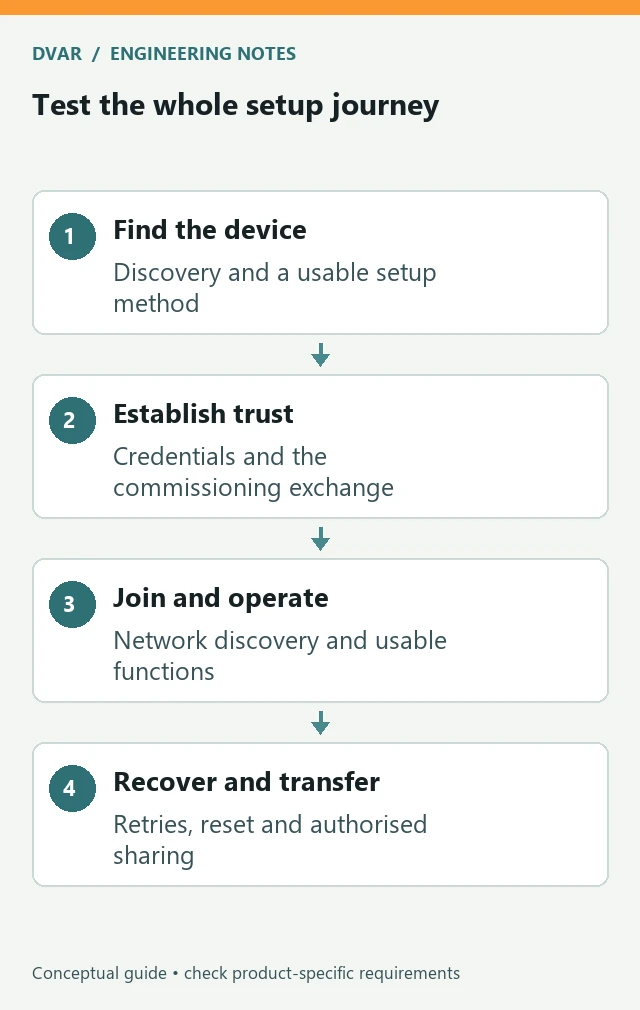
A Matter device is not ready for customers merely because one phone paired with it once. Test the complete journey: finding the device, establishing trust, joining its operational network, controlling its functions and recovering when something interrupts the process.
The Connectivity Standards Alliance’s June 2026 Matter 1.6 release adds capabilities including near-field communication (NFC) commissioning and Joint Fabric for multi-ecosystem administration. The Alliance also notes that adoption will vary by company and product. A feature in the specification is therefore not proof that every controller or installed device supports it.
Write the support boundary before the test matrix
List the actual device firmware, SDK, phone operating systems, controller applications, hubs and network types you intend to support. Record the setup methods implemented by this product. If it offers a QR-code path and a manual-code path, test both. If a newer NFC commissioning method is not implemented, do not include it in the product promise merely because it exists in the specification.
Keep this list with the release evidence. “Works with Matter” is too broad to diagnose a failure involving a specific phone build, gateway configuration or controller version. A useful result lets another engineer reproduce the combination without relying on the tester’s personal home network.
Distinguish onboarding from normal operation
Google’s Matter primer describes an IP-based application protocol built on IPv6. Its introductory material covers Matter 1.0, so use it for the foundations rather than as a complete description of later setup methods. In particular, do not confuse a commissioning transport with the device’s operational network.
The commissioning walkthrough separates operational credentials, network provisioning, discovery and establishment of a certificate-authenticated session. It notes that an already connected Ethernet device does not need the same network-provisioning step as a Wi-Fi or Thread device. Use those boundaries to organise logs and failure reports; a single “pairing failed” status hides the part of the process that needs attention.
Test the uncomfortable setup conditions
- Start with a factory-new device and with a previously commissioned device.
- Try the supported setup methods with the label in its final physical location.
- Interrupt a setup attempt, then verify that the documented retry route works.
- Use incorrect network credentials and check that the user receives a useful recovery instruction.
- Restart the device and relevant network equipment at defined points in the test.
- Check the promised behaviour when internet access is unavailable, separately from loss of the local network.
- Repeat the test using the final enclosure and intended power arrangement.
These are test scenarios, not permission to bypass commissioning security. Do not log live setup codes, private keys or customer credentials into a shared issue tracker. Preserve enough non-secret state to identify the failed stage, together with software versions and timestamps. Use controlled lab credentials for repeatable fault cases.
Make sharing and reset explicit
Matter 1.6’s Joint Fabric provides a particular shared-administration approach; it should not be treated as interchangeable with every earlier multi-admin mechanism. For your implemented approach, specify the expected effect of adding an authorised controller, removing one and transferring the product to a new owner. Then test those transitions on the supported ecosystem combinations.
A reset requirement should describe the resulting state, not just a button sequence. Which credentials should be removed? What should a former controller be able to do afterwards? What should the new owner see? Establish the intended answers with the product and security teams, and compare the observed behaviour against those requirements.
Turn failures into actionable evidence
For each failed attempt, record the starting state, hardware and firmware revision, controller and network configuration, exact stimulus, observed outcome and recovery path. Capture whether the failure happened before network attachment, during discovery or during normal control. Keep logs synchronised well enough to reconstruct the sequence across the device and controller.
Report results against the combinations actually tested. A useful engineering statement is narrower than a blanket interoperability claim: it identifies the supported configuration, the test coverage and the remaining limitations. Keep formal certification work distinct from your internal regression evidence and plan both within the product schedule.
Before the next product build
Confirm that the setup label remains readable, the reset method is documented, failures produce useful diagnostics and the support team has a recovery procedure. DVAR’s product development and embedded software services connect those physical and software decisions, helping a connected product behave as a coherent system rather than a successful laboratory pairing.